
Instructions for Preparing Standard Business Cards
- Use only CMYK color mode;
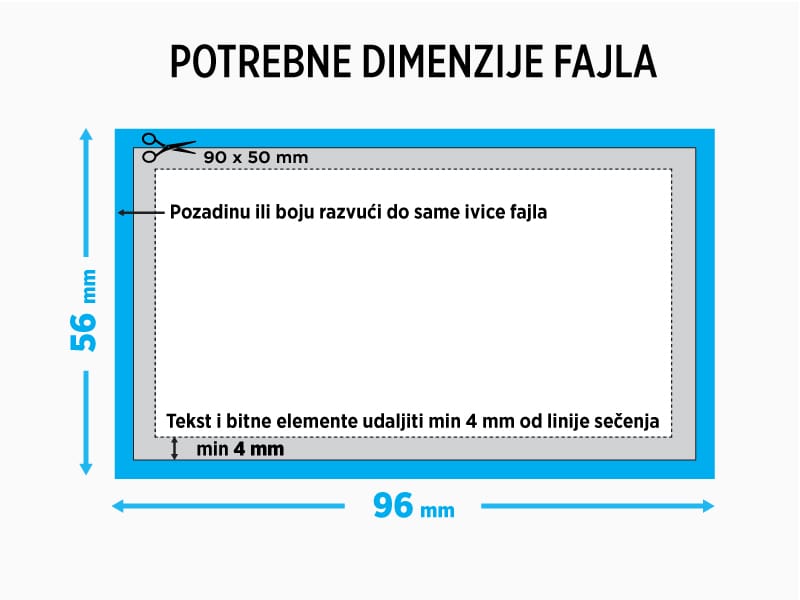
- For the best print quality, we recommend sending a .pdf file with dimensions 96x56 mm;
- The background should extend to the very edge of the file, and text and important elements should be placed at least 4 mm inside the trim line;
- The optimal image resolution is 300 DPI;
- Text should be converted to curves or embedded in the document, because a font may fail to load and not display correctly on our side;
- Black text must be made from a single color, 100% black, C=0, M=0, Y=0, K=100;
- Larger black areas should be set to: C=30, M=30, Y=30, K=100;
- We do not recommend using small fonts under 8 pt;
- Please carefully check all text, because we do not check spelling or typographical errors;
We recommend creating files in programs such as Adobe Illustrator, Adobe Photoshop, Adobe InDesign or CorelDRAW. We do not recommend creating files in programs such as Microsoft Word, PowerPoint, Excel and similar applications.
Templates for this product can be downloaded on the following page (near the bottom): Download Template